There is a strange misconception about AI image generation.
People think prompting is about finding the right combination of words.
Add "cinematic."
Add "8K."
Add "masterpiece."
Add "photorealistic."
Add "ultra detailed."
Maybe add "award-winning photography."
Then hit Generate.
Sometimes it works.
Often, it doesn't.
The problem isn't necessarily the model.
The problem is that we're treating a generative model like a search engine.
It isn't one.
When you write a prompt, you're not simply describing an image.
You're giving the model a set of instructions it uses to construct one.
Understanding that changes everything.
So, How Does AI Actually Understand a Prompt?
At a high level, modern generative image models don't read a prompt exactly the way a human does.
They process language into representations that connect words and concepts to visual patterns learned during training.
When you write:
"A woman standing in a rainy Tokyo street at night"
the model doesn't open a database and find a photograph matching those words.
It interprets relationships between concepts:
woman + standing + rain + Tokyo + street + night
and uses those concepts to construct an image that statistically fits the description.
Add more information:
"A young woman in a red coat stands beneath a transparent umbrella on a neon-lit Tokyo street at night."
Now the model has more constraints.
Subject: young woman Wardrobe: red coat Object: transparent umbrella Environment: Tokyo street Lighting: neon Time: night Action: standing
You are reducing ambiguity.
That is one of the fundamental principles of prompting:
The more important the detail, the more clearly you should communicate it.
A Prompt Is a Hierarchy of Information
A useful way to think about an image prompt is as a hierarchy.
Start broad.
Then become specific.
A strong general structure is:
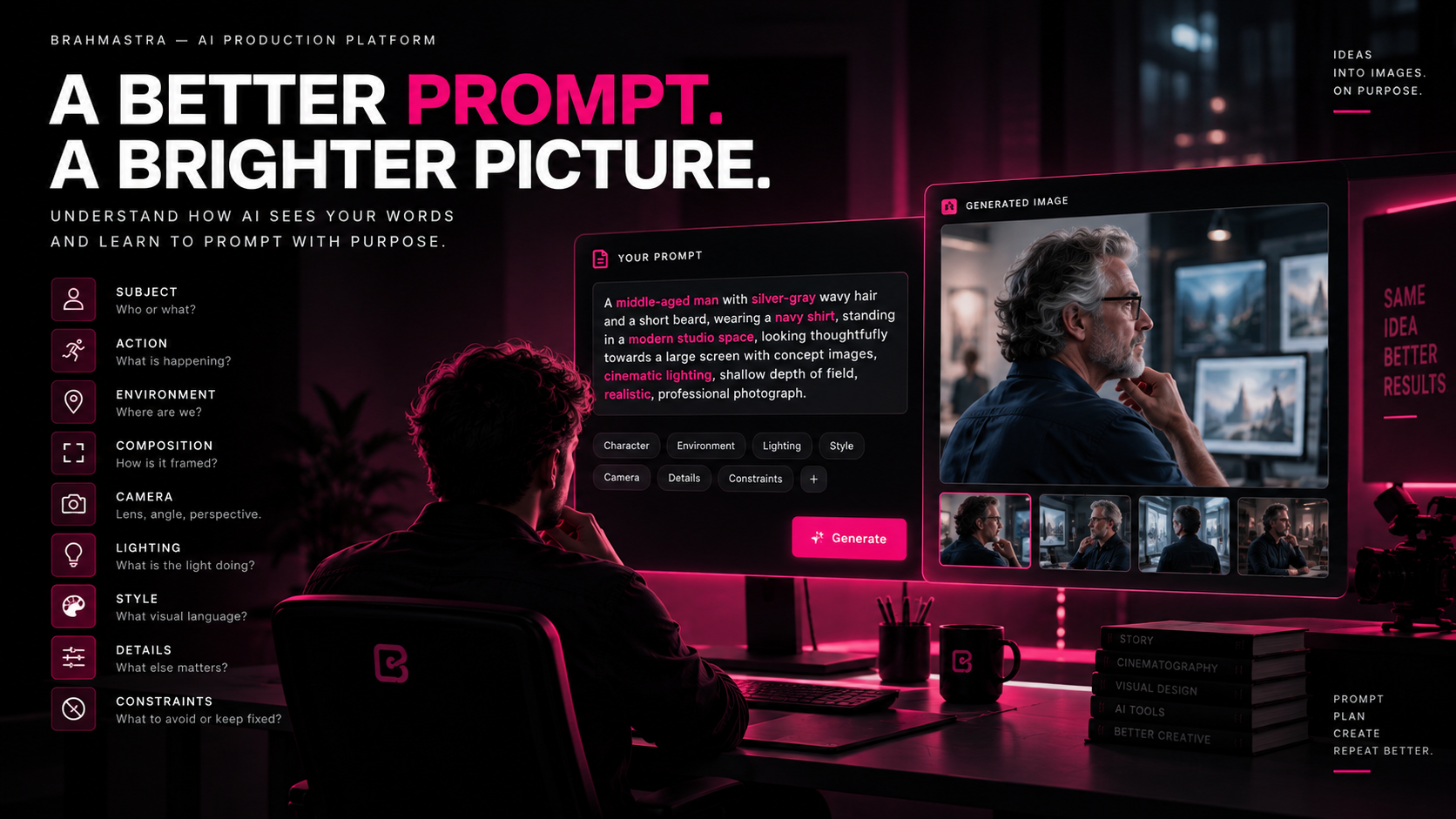
Subject → Action → Environment → Composition → Camera → Lighting → Visual Style → Details → Constraints
Not every prompt needs every category.
But understanding these categories gives you a framework for constructing almost any image.
Let's break them down.
1. Subject — What Are We Looking At?
Start with the primary subject.
Who or what is the image about?
Examples:
- A young Indian woman
- An astronaut
- A vintage motorcycle
- A luxury watch
- A medieval warrior
- A family sitting around a dinner table
- A futuristic electric car
Don't start with ten visual effects.
Start with the thing that matters.
Instead of:
"Cinematic, dramatic, beautiful, highly detailed, atmospheric..."
Say:
"A middle-aged man with silver-gray wavy hair and a short gray beard..."
Now the model has an actual subject to construct.
2. Identity — What Must Stay Specific?
If the subject is a recurring character, description becomes even more important.
Think beyond:
"A handsome man."
That leaves enormous room for interpretation.
Instead:
"A man in his early 40s with curly dark hair, a short mustache, strong eyebrows, and a narrow jaw."
You can then establish additional identity information:
Face
Age, facial structure, hair, eyes, skin characteristics.
Body
Build, height impression, posture.
Wardrobe
Clothing, colors, materials, accessories.
Signature details
Glasses, scars, jewelry, hairstyle, tattoos, etc.
The more important the identity is to your production, the more deliberately it should be established.
And for recurring characters, don't rely on text alone.
Reference images are often more powerful than increasingly long descriptions.
3. Action — What Is Happening?
An image becomes much more useful when you describe what the subject is doing.
Compare:
"A man in a city."
with:
"A man walking toward the camera while looking over his shoulder."
The second prompt introduces:
- Movement
- Body orientation
- Gaze
- Camera relationship
Action is especially important when the image will later become a video.
If you already know the shot needs to transition into motion, create the still with that future movement in mind.
4. Environment — Where Are We?
Now establish the world around the subject.
Think about:
Location
Where does the scene take place?
Architecture
What surrounds the character?
Objects
What should exist in the environment?
Time
Morning, afternoon, sunset, night?
Weather
Rain, fog, snow, dry heat?
Atmosphere
Crowded, empty, peaceful, chaotic, threatening?
For example:
"He stands in a vast modern stone plaza surrounded by tall glass-and-stone office buildings."
That is much more useful than simply saying:
"Beautiful city background."
Specificity creates structure.
5. Composition — How Is the World Arranged?
This is where prompting starts becoming cinematography.
Don't only describe what exists.
Describe where it exists in the frame.
For example:
"The character stands on the right third of the frame, leaving negative space toward the left."
Now you are directing composition.
Useful concepts include:
- Foreground
- Midground
- Background
- Negative space
- Symmetry
- Leading lines
- Rule of thirds
- Center framing
- Layered composition
- Depth
You can also describe relationships:
"The character is framed between two architectural columns."
or:
"Foreground foliage partially obscures the lower edge of the frame."
The model now has a spatial instruction, not just a list of objects.
6. Camera — Where Is the Viewer?
One of the biggest improvements you can make to AI image prompting is to start thinking about the camera.
Ask:
Where is the camera?
How high is it?
How close is it?
What lens perspective are we seeing?
Useful terms include:
Shot size
- Extreme wide shot
- Wide shot
- Medium wide
- Medium shot
- Medium close-up
- Close-up
- Extreme close-up
Camera angle
- Eye level
- Low angle
- High angle
- Overhead
- Ground level
- Dutch angle
Lens perspective
- Wide-angle
- Normal perspective
- Telephoto
- Macro
For example:
"Medium close-up, eye-level camera, shallow depth of field."
This tells the model significantly more than:
"Make it cinematic."
7. Focal Length Changes the Image
A lens isn't just a technical specification.
It changes how the scene feels.
A wide lens can exaggerate space and make foreground objects feel larger.
A longer lens can compress distance and isolate a subject.
Compare:
"A man standing in a hallway."
with:
"A man standing at the end of a long hallway, photographed with a wide-angle perspective."
Now the spatial relationship becomes part of the image.
Or:
"A portrait photographed with a longer telephoto perspective and a compressed background."
The same person can feel completely different.
This is why good AI prompting benefits from basic cinematography knowledge.
8. Lighting — Don't Just Say "Cinematic"
"Cinematic lighting" is vague.
Instead, describe what the light is doing.
Ask:
Where is the light coming from?
What is its quality?
What is it illuminating?
What remains in shadow?
Useful descriptions include:
- Soft window light
- Hard sunlight
- Backlight
- Rim light
- Side light
- Top light
- Practical lighting
- Diffused overcast light
- Golden-hour sunlight
- Neon illumination
- Volumetric light
For example:
"Warm sunset backlight creates a bright rim around the character's hair while the face remains softly exposed."
That's direction.
You're not just asking for "beautiful lighting."
You're specifying the lighting behavior.
9. Color — Control the Visual Palette
Color can help establish emotion, genre, brand identity, and continuity.
You can describe:
- Warm or cool palette
- Muted colors
- High saturation
- Earth tones
- Monochromatic palette
- Complementary colors
- Specific dominant colors
For example:
"A restrained palette of charcoal, cream, and muted amber."
This can be especially useful when building a consistent visual world.
10. Materials and Texture
AI can interpret physical materials surprisingly well—but you need to tell it what matters.
Instead of:
"A luxury room."
Try:
"Dark walnut walls, brushed brass fixtures, polished black stone flooring, and heavy textured linen curtains."
Now the scene has physical information.
This is particularly important for:
- Product photography
- Architecture
- Fashion
- Automotive
- Production design
- Close-up shots
When something needs to feel real, materiality matters.
11. Style — What Visual Language Are We Using?
Style is often where people throw the largest number of keywords.
But style should answer a specific question:
What visual language should this image have?
You might specify:
- Photorealistic
- Documentary
- Editorial fashion photography
- Commercial product photography
- Period drama
- Sci-fi concept art
- Painterly illustration
- Graphic novel
- Animation
- Film still
Be careful with stacking styles.
If you ask for:
"cinematic + anime + documentary + oil painting + hyperrealistic + fashion editorial"
you're not necessarily giving the model more control.
You're giving it conflicting instructions.
Choose a visual direction first.
Then refine it.
12. Details — Add What Actually Matters
Once the major structure is established, add important details.
For example:
"A small silver ring on his right hand."
"Rain droplets visible on the jacket."
"A faint reflection of the city lights in the window."
Details can make an image feel specific.
But there is an important rule:
Don't describe everything equally.
If every element is extremely important, nothing is important.
Prioritize.
13. Constraints — Tell the Model What Must Not Change
Sometimes the most important information is what you don't want the model to alter.
Examples:
"Keep the character's facial identity unchanged."
"Preserve the original product packaging exactly."
"No additional logos."
"No text in the environment."
"Keep both hands visible."
"Maintain the same wardrobe."
Constraints are particularly important for professional production.
The difference between:
"Create a beautiful product advertisement."
and
"Create a luxury product advertisement while preserving the exact product shape, packaging, logo placement, and label design."
is enormous.
Positive Instructions vs. Negative Instructions
There are two broad ways of communicating constraints.
Positive instruction
Tell the model what you want.
"A clean studio background with soft shadows."
Negative instruction
Tell the model what you don't want.
"No additional objects, no extra logos, no text."
Both can be useful.
But don't create enormous lists of negative prompts just because you can.
A clearer positive description is often more effective.
Instead of:
"No blur, no distortion, no bad anatomy, no weird hands, no ugly face..."
you can often improve the underlying description:
"Natural human anatomy, realistic hands, clean facial structure, sharp subject with controlled depth of field."
Prompt Order: Does It Actually Matter?
There isn't one universal prompt grammar that works identically across every AI image model.
Different systems interpret prompts differently.
Some respond strongly to natural language.
Some respond well to structured descriptions.
Some give greater weight to references.
Some expose explicit controls.
Some models may effectively weigh concepts differently depending on their architecture and interface.
So don't obsess over finding a magical ordering formula.
Instead, think in terms of information hierarchy.
Put the most important information where the system can clearly understand it.
A useful starting structure is:
Subject + Action + Environment + Composition + Camera + Lighting + Style + Important Details + Constraints
Then adapt based on the model you're using.
The Difference Between Description and Direction
This is one of the most important concepts in AI image creation.
Description
"A man in a dark suit standing in a futuristic city at night."
This tells us what exists.
Direction
"A tired man in a dark suit stands alone in the middle of a futuristic city after midnight. He looks toward a distant tower while crowds move around him without noticing him. Wide shot from slightly behind, the character positioned on the left third of the frame, cool architectural lighting with a single warm practical light separating him from the background."
Now we understand:
- Who he is
- What he's doing
- What he feels
- Where he is
- What the audience should notice
- Where the camera is
- How the frame is composed
- How the light behaves
That is why good prompting starts to resemble directing.
Don't Make Every Prompt a Novel
Longer doesn't automatically mean better.
A 500-word prompt can still be vague.
A 50-word prompt can be extremely precise.
The objective isn't:
maximum words.
The objective is:
minimum ambiguity for the things that matter.
If the character identity matters, spend words there.
If the camera matters, specify it.
If the product must remain exact, define the constraint.
If the background is irrelevant, don't waste half the prompt describing it.
A Practical Prompt Framework
When you don't know where to start, use this framework:
SUBJECT
Who or what is the primary subject?

ACTION
What are they doing?

ENVIRONMENT
Where are they?

COMPOSITION
How are the elements arranged in the frame?

CAMERA
What shot size, angle, and perspective are we using?

LIGHTING
Where does the light come from and what does it do?

STYLE
What visual language are we using?

DETAILS
What specific elements matter?

CONSTRAINTS
What must remain accurate or unchanged?
Then turn those decisions into natural language.
Example: From Weak Prompt to Directed Prompt
Weak
A cinematic man walking in a futuristic city, very realistic, 8K, dramatic lighting.
It sounds impressive.
But almost everything is ambiguous.
Better
A man in his early 40s with silver-gray wavy hair and a short gray beard walks alone through a futuristic downtown plaza at dusk, wearing a dark navy shirt and charcoal trousers. Glass-and-stone towers surround the plaza. He walks toward the camera with a focused expression while distant pedestrians move behind him. Medium-wide shot at eye level, 50mm perspective, warm sunset backlight creating a subtle rim around his shoulders, realistic skin texture, restrained cinematic color palette.
Now the model has a much clearer specification.
Even better for production
Add the things that must remain consistent:
Preserve the character's facial identity, hairstyle, wardrobe, and body proportions. Keep the architecture consistent with the established location. No additional accessories, logos, or text.
Now you're not just generating an image.
You're establishing a production asset.
Use References When Words Aren't Enough
There are things language is simply bad at communicating.
Exact faces.
Exact products.
Specific costumes.
Architectural designs.
Color relationships.
Existing shots.
For these, reference images can be dramatically more useful than adding another 200 words to your prompt.
Instead of describing everything from scratch:
reference + instruction + constraints
can be a much stronger workflow.
For example:
"Use the attached character reference for identity. Place the character in the described environment. Preserve facial structure, hairstyle, and wardrobe."
The text tells the model what to do.
The reference tells it what something actually looks like.
Prompting for a Single Image vs. Prompting for a Film
This distinction matters.
If you're creating one image for exploration, you can afford more creative freedom.
If you're creating a shot for a film, the image has to belong to something larger.
You need to think about:
Previous shot
What came before?
Current shot
What are we showing?
Next shot
Where are we going?
Continuity
What must remain unchanged?
Purpose
Why does this shot exist?
This is where AI image generation becomes part of production design rather than simply image generation.
The Best Prompt Is Often Written Before You Open the Generator
Before touching the model, answer five questions:
1. What am I trying to show?
The subject and story beat.
2. What does the audience need to feel?
The emotional intent.
3. Where should the camera be?
The visual perspective.
4. What must remain consistent?
Identity, location, product, wardrobe, props, lighting.
5. What matters most?
Your priority.
Once those are clear, the prompt becomes much easier.
AI Is Not Your Director
This is the bigger lesson.
An AI model can generate extraordinary images.
But it doesn't automatically know which image is right for your story.
It can give you ten beautiful compositions.
Only you can decide which one communicates the scene.
It can generate a hundred character variations.
Only you can decide which one becomes your character.
It can produce endless camera movements.
Only you can decide which movement belongs to the story.
AI gives you possibilities.
Direction gives those possibilities meaning.
Prompting Is a Creative Skill
The goal isn't to memorize prompt formulas.
The goal is to develop the ability to translate an idea into visual instructions.
The better you understand:
- Story
- Composition
- Camera
- Lighting
- Performance
- Production design
- Color
- Continuity
- Editing
the better you'll become at using generative AI.
Because the model isn't replacing those skills.
It is giving you a new interface through which to apply them.
From Prompting to a Production Language
This is where the future gets interesting.
Imagine a production where the system already knows:
This is the character.
This is the location.
This is the product.
This is the wardrobe.
This is the camera language.
This is the approved shot.
This is what changed.
Then prompting becomes much more powerful.
You aren't repeatedly describing the entire universe in every generation.
You're giving the AI an instruction inside an established production context.
That is the direction Brahmāstra is taking.
The goal isn't to make prompts longer.
It's to make the production smarter.
The Simple Rule
When creating an AI image, don't ask:
"What words should I put into the prompt?"
Ask:
"If I were directing a photographer, cinematographer, production designer, and actor for this shot, what would I tell them?"
That answer is your prompt.
And the better you become at answering it, the better your AI images become.
Because the future of AI filmmaking won't belong to the people who generate the most.
It will belong to the people who know what to generate.
Don't prompt harder. Direct better.
— Brahmāstra